2025 was an exciting year for Argo, with a host of new and improved features designed to make navigation safer and more enjoyable. From long-awaited upgrades to multi-point auto routing to clever new tools like Stay in Channel routing, we’ve focused on enhancements that matter most to boaters.
In this post, we’ll walk through our top 10 features of 2025, showing what they are, why they matter on the water, practical use cases, and tips for getting the most out of them in Argo.
Top 10 Argo Features Released in 2025:
10. Cleaner Navigation Screen
9. Sun Glare Chart Shadings
8. Argo on Mac
7. A to B Measurement Tool
6. Heading Information Panel
5. Tide and Current Stations
4. NMEA / AIS Integration
3. Offline Improvements
2. Stay in Channel Routing
1. Multi-Point Auto Routing
Here’s a look at our top 10 features of the year and how they can make your time on the water easier and more fun.
10. Cleaner Navigation Screen for Easier At a Glance Navigation
The Argo navigation screen got a refresh in 2025 to make it easier to see what matters most while you’re underway. By simplifying the layout and enlarging key visuals, the chart stays clear and focused on navigation.
Why it matters on the water
When you’re moving, especially in tight waterways or busy harbors, screen clutter can slow you down or distract you. A cleaner navigation screen makes it faster to read your position, instruments, and surroundings without hunting for critical information.
- Example Use Case: Checking your heading, depth, and surroundings while approaching a marina entrance.
- Who it is best for: Boaters navigating in busy areas, anyone who relies on quick visual cues, and users who want a more streamlined chart view.
How it works in Argo
- The social drawer was removed from the bottom of the navigation screen to reduce visual clutter
- Community features like friends, groups, and the social feed are still available through a dedicated button
- Navigation icons and gauges were resized for better readability
- The overall layout was refined to prioritize charts and core navigation data
Where to find it in the app:
- Navigation screen during active use on the water
Learn more about the main navigation screen in this tutorial.
9. Sun Glare Chart Shadings for Better Chart Visibility
Bright sunlight can make charts difficult to read, especially when trying to interpret depth and contours quickly. Argo’s 2025 sun glare reduction shading presets simplify chart visuals so you can navigate confidently in harsh light.
Why it matters on the water
Glare can obscure depth readings, contour lines, and nearby hazards, slowing down decision-making and increasing risk. High-contrast presets make critical chart information instantly readable, even on bright LCD or OLED screens, so you can focus on navigating instead of struggling with your display.
- Example use case: Running midday in open water when the sun is reflecting off the chart and surrounding water.
- Who it is best for: Boaters navigating in strong daylight, coastal cruisers, and anyone who needs clear chart visibility in high-glare conditions.
How it works in Argo
- Enable a shading preset: Go to Chart Display → Depth Shading → Presets and select either White (Preset 2) or Monochrome (Preset 3)
- Preset 2 – White: All navigable water is white with shallow areas under 5 feet in light blue. Contour lines and depth numbers are high contrast for maximum readability.
- Preset 3 – Monochrome: Grayscale shading with four shades for shallow-to-moderate depths, transitioning to white beyond 20 feet. Preserves near-field depth information while simplifying deeper areas.
- Adjust settings: Customize depth ranges, shades, and colors to match your boat, waters, or preferences
- Best practices: Works especially well in satellite view to clearly separate land from water and reduce eye strain in bright sunlight
Where to find it in the app:
- Menu → Map Options → Depth Shading → Presets 2 and 3 (Premium feature)
Learn more about customizing your depth shading in this tutorial.
8. Argo on Mac for Larger Screen Planning and GPS-Synced Navigation
In 2025, Argo expanded beyond mobile devices with a Mac version, allowing boaters to plan and follow routes from a larger screen. The Mac app mirrors the tablet interface while syncing GPS data from your boat, combining desktop convenience with real-time navigation.
Why it matters on the water
Planning routes on a small tablet can feel cramped, especially for longer voyages or complex routes with multiple waypoints. A larger screen makes it easier to see charts, assess hazards, and review routes before or during navigation, all while staying in sync with your boat’s GPS for real-time accuracy.
- Example use case: Editing a multi-point route from your Mac while docked, then following it seamlessly once underway.
- Who it is best for: Boaters who like to plan on a desktop, long-distance cruisers, yacht owners, and anyone who wants a larger view of their charts.
How it works in Argo
- Install and log in: Download the Argo app from the Apple Store and log in with your Argo account. Note that Apple Store currently has it labeled as an iPad app, but it’s fully functional on your Mac.
- Sync with your boat: Connect via GPS or NMEA gateway to sync real-time position with your vessel
- Tablet interface: The app uses the same tablet-style layout, so charts, depth shading, and routing features work the same as on iOS or Android
- Plan and edit routes: Drag and drop waypoints, add stops, and review multi-point routes on the larger display
- Updates and improvements: Argo is continuing to optimize the Mac experience, including full-screen use and enhanced chart performance
Where to find it in the app:
- Download from the Apple Store. The Apple store will say it was designed for the iPad.
7. A to B Measurement Tool for Quick Distance Calculations
Argo’s new A to B measurement tool makes it simple to calculate straight-line distances between any two points on your chart. It’s a fast, precise way to check upcoming bridges, locks, or landmarks without cluttering your navigation.
Why it matters on the water
Knowing exact distances helps you plan maneuvers, estimate arrival times, and anticipate hazards. Without an easy measurement tool, you might rely on rough guesses or external calculators, which can slow decision-making and add stress while navigating.
- Example use case: Checking the distance to an approaching bridge before adjusting course.
- Who it is best for: Boaters planning trips with multiple landmarks or obstacles, cruisers, and anyone who values precise navigation information.
How it works in Argo
- Activate the tool: Tap the Measurement Icon on the middle right side of the main chart screen to enable A to B mode (it looks like a miniature ruler)
- Set points: Place two pins anywhere on the chart; the distance between them is calculated “as the crow flies”
- Adjust easily: Drag either pin to update the measurement instantly
- Toggle on and off: Tap the Measurement Icon again to turn the tool off and return to normal chart navigation
- Accuracy: Designed to be precise and simple, without cluttering the screen
Where to find it in the app:
- Measurement icon on the main chart view (looks like a ruler)
6. Heading Information Panel for Real-Time Navigation Info
Argo’s Heading Information Panel provides live data on your bearing, course, and time/distance to your next turn. This feature gives you essential heading information at a glance while following a planned trip or race.

Why it matters on the water
When navigating a route, especially for racing or long passages, knowing your exact heading and distance to the next waypoint or turn is critical. Without this information readily visible, you may make course adjustments too late or misjudge timing, reducing efficiency and safety.
- Example use case: Following a planned route and seeing your current course over ground (COG), distance, and time to the next waypoint in real time.
- Who it is best for: Racers, coastal cruisers, and anyone using multi-point routes or voyages who wants precise situational awareness.
How it works in Argo
- Enable the panel: Turn on the Heading Info Panel via the chart cursor toggle or in Settings → Navigation Settings → Auto Heading Info
- Automatic display: Can be set to appear automatically when following a route
- Data included: Shows bearing, course over ground, time, and distance to next turn
- Toggle off as needed: You can disable it anytime if you prefer a cleaner chart view
- Use during navigation: Designed for real-time use on both short and long passages
Where to find it in the app:
- Chart cursor toggle or Menu → Settings → Navigation Settings → Auto Heading Info
Watch a live demonstration of the Heading Information Panel within Argo.
5. Tide and Current Stations for Real-Time Water Conditions
Argo now integrates with thousands of tide and current stations, giving boaters a clear 7-day forecast of both tidal fluctuations and current patterns. This feature helps you plan trips with greater confidence and avoid surprises on the water.
Why it matters on the water
Tides and currents affect safe navigation, anchoring, and passage timing. Knowing these conditions in advance helps boaters avoid grounding, reduce fuel use, and improve overall trip planning. A visual, easy-to-read forecast saves time and keeps navigation decisions simple and accurate.
- Example use case: Checking the tidal and current forecast before departing Charleston Harbor to ensure smooth passage through the shipping channel at high tide.
- Who it is best for: Boaters in tidal regions such as the U.S. East Coast, Gulf Coast, and Pacific Northwest; coastal cruisers, mariners navigating estuaries, and anyone planning trips where currents or tides significantly impact safety or timing.
How it works in Argo
- View stations on chart: Station icons are blue for flood (tide rising) and red for ebb (tide falling). Zoom in and tidal height or current speed will appear within the station icon.
- Access stations: Tap on any tide or current station on the chart
- View forecast: Scroll through a 7-day visual forecast of tidal heights or current speeds
- Stations included: Covers approximately 6,000 NOAA stations for tides and currents
- Chart integration: Forecast is overlaid visually on the chart for easy interpretation
- Interactive and easy-to-use: Designed for quick, at-a-glance understanding without clutter
Where to find it in the app:
- View or tap on any tide or current icons on the chart
Want more information than just tides and currents? Learn more about Argo’s marine weather forecasts.
4. NMEA / AIS Integration – Real-Time Vessel Tracking and Instrument Data
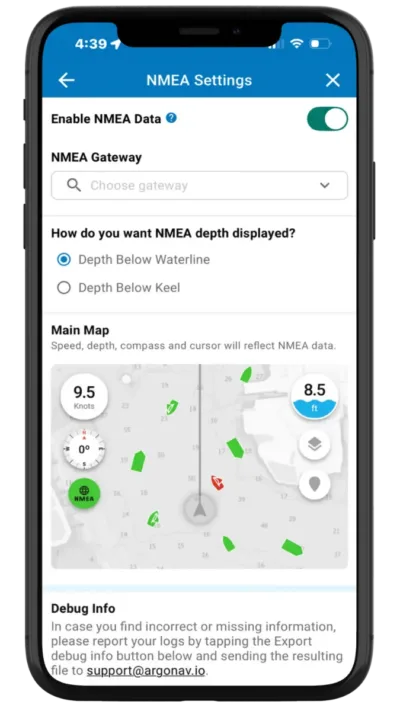
Argo now connects directly to your boat’s instruments via NMEA, displaying vessel speed, depth, compass, GPS data, and AIS targets in one place. This gives boaters a complete view of their boat and surrounding traffic for safer, more confident navigation.
Why it matters on the water
Accessing real-time data from your vessel and nearby boats increases safety, particularly in congested channels or during night navigation. Instead of juggling multiple instruments, you see everything in a single, integrated view, improving reaction time and situational awareness.
- Example use case: Monitoring depth, heading, and AIS traffic while entering a busy marina to avoid collisions.
- Who it is best for: Boaters with NMEA-compatible instruments and AIS receivers, sailors and powerboat operators in crowded harbors, and anyone navigating channels or waterways with heavy traffic. Particularly useful in regions like the U.S. East Coast, Florida Keys, and (eventually) European inland waterways.
How it works in Argo
- Connect your instruments: Works with NMEA gateways to connect to your real-time vessel data
- Data displayed: Vessel speed, depth, compass, GPS location, and AIS objects
- Compatibility: Works with most NMEA-compatible devices and AIS receivers
- Real-time updates: Provides immediate situational awareness on the chart
- Optional display: Toggle the AIS overlay and vessel data on or off as needed
Where to find it in the app:
- Menu → Settings → NMEA Settings, or tap the AIS/Vessel Data icons on the chart
Watch a live demo of Argo’s NMEA Integration.
3. Offline Improvements – Larger Charts, Automatic Downloads, and Manual Routing
Argo has upgraded offline navigation in 2025, making it easier than ever to plan and navigate without internet access. Boaters can download larger areas faster (Standard or NOAA), set charts to download automatically around your location, and even plan manual routes while disconnected.
Why it matters on the water
Limited or no cellular coverage in remote areas can make navigation stressful and risky. With these offline improvements, you can confidently plan trips, track your position, and follow manual routes anywhere, reducing stress and improving safety.
- Example use case: Set Argo to automatically download charts so you no longer have to remember to download before heading out on your next cruise.
- Who it is best for: Cruisers in remote regions, boaters planning multi-day trips, and anyone who navigates areas with limited cell coverage.
How it works in Argo
- Download larger areas: Charts up to 20x bigger, faster, and in the background
- Chart options: Choose between standard depth-shaded charts or NOAA ENC charts
- Automatic downloads: Set a radius around your current location or homeport for automatic offline downloads
- Offline chart preview: Preview what your charts will look like once you lose cell service
- Manual offline routing: Plan and adjust routes while offline; offline auto-routing coming in 2026
Where to find it in the app:
- Menu → Offline Charts
Learn more about how to use Argo’s offline features.
2. Stay in Channel Routing – Follow Buoys for Safer, Stress-Free Navigation
Argo now offers a completely new “Stay in Channel” routing option, something no previous version included. Your route automatically follows marked navigation channels between red and green buoys, using trusted navigational cues. This ensures you remain in safe, navigable waters, even in narrow rivers or busy waterways.
Why it matters on the water
Channels mark the safest path through a waterway, avoiding shallow spots, rocks, and other hazards. Before this feature, Argo only offered shortest-path, inside passage, outside route, or shore-hugging routes—none of which could automatically follow the channel itself. Staying in the channel reduces the risk of grounding or collisions and gives boaters more confidence in unfamiliar areas.
- Example use case: Piloting a large vessel through a crowded harbor or narrow river, automatically staying in the marked channel to avoid shallow spots, shoals, and underwater hazards.
- Who it is best for: Boaters in marked channels, rivers, or estuaries; pilots of larger vessels; anyone towing or new to an area. Especially valuable in the U.S. East Coast rivers, Gulf Coast inlets, and eventually European inland waterways.
How it works in Argo
- Enable option: Turn on “Stay in Channel” in routing options when creating or editing a route. You can also set it under Settings → Autorouting Settings.
- Automatic channel routing: Routes are adjusted to stay between red and green buoys
- Flexible choice: Other routing options—shortest path, inside/outside routes, shore-hugging—remain available
- Shortcut access: Toggle the option during route creation.
- Visual guidance: Channel path is displayed clearly on the chart for easy following
Where to find it in the app:
- Routing options (in the upper right) while creating a route, or Settings → Autorouting Settings
1. Multi-Point Auto Routing – Plan Smarter Trips with Stops Along the Way
Argo now lets you add multiple points to your auto routes, making it easy to plan trips with stops for fuel, anchorage, or sightseeing. You can also drag and drop points to adjust your path, giving you full control over your route. This feature brings auto routing up to the level boaters expect from modern navigation apps, giving full control over the path of your trip.
Want to learn more about Autorouting with waypoints? We put together a second demo video with more options.
Why it matters on the water
Before this update, Argo’s auto routing didn’t allow multiple points or route edits, which limited flexibility. With multi-point routing, you can tailor your trip to fit your needs or local knowledge—for example, going one way around an island instead of the route Argo automatically suggests. Whether planning a coastal run with fuel stops or customizing your auto route, this feature makes navigation smoother and more predictable.
- Example use case: Mapping a coastal trip with an anchorage halfway and a fuel stop near the destination, all in one seamless auto route.
- Who it is best for: Cruisers planning longer trips, boaters making multiple stops along the coast, and anyone who wants precise control over their route.
How it works in Argo
- Add multiple points: Drop additional waypoints along your route for stops or navigational checkpoints
- Drag-and-drop editing: Rearrange points easily to optimize your path
- Undo and Clear buttons: Inadvertently move a point you can use the undo button to easily fix things.
- Automatic rerouting: Routes update dynamically if points are added, moved, or removed
- Flexible route types: Works with shortest-path, inside passage, outside route, or Stay in Channel options
- Smooth user experience: All edits and route changes are fast, intuitive, and responsive
Where to find it in the app:
- Routing screen → Add Waypoint (+) button or edit existing route
Learn more about using Autoroute in this tutorial.
Looking Ahead: What’s Next for Argo
To say the least, 2025 was an awesome year for Argo. We’ve crushed 2025 with features that make navigation safer, smarter, and more enjoyable.From multi-point auto routing to Stay in Channel guidance and enhanced offline charts, these updates are designed to help you spend less time worrying about your route and more time enjoying the water.
We’re already looking ahead to 2026, with snappier performance, new partnerships, and even more features in the works. As always, we love hearing from our users—your feedback shapes the future of Argo, so explore these tools and see how they work for you.
Want to help shape 2026? Let us know your thoughts via this quick questionnaire.